MDSteps CCS Practice

Turn Step 3 CCS practice into a supervised competency workflow.

Assign unknown CCS cases, lock learner access to assigned work, compare decision logs, and turn case performance into actionable remediation data.

Remediation support Scope-controlled cases Competency evidence CSV exports

For residency programs, tutoring companies, IMG cohorts, and instructor-led Step 3 groups.

Designed for program realities
  • Create a controlled CCS sandbox for assigned cases.
  • Prevent full-library access from spoiling assessment cases.
  • Review step-by-step management decisions, not just final scores.
  • Use reports for remediation, academic half-days, and cohort review.
  • Export completion and performance records.

Why residency programs need a scoped CCS cohort workflow.

Program directors need more than self-study access. They need assignment control, objective remediation data, and step-by-step case review.

Remediation is common — and hard to scale

Formal and informal remediation are recurring program responsibilities, not rare exceptions.

2%–15% of residents per program may require remediation.
0%5%10%15%
2% 15%
93%
93% of residency programs reported at least one resident in remediation within a 3-year window.

Clinical judgment is a leading remediation trigger

Underperformance often reflects how learners apply knowledge under pressure.

Competency-related deficits frequently center on knowledge application and real-time decision-making.

Documentation is a major barrier

Programs need objective evidence before remediation can become specific and defensible.

22% cite lack of documented objective evaluations as the biggest challenge to effective remediation planning.
Step-by-step simulation logs turn remediation from a vague faculty burden into a documented review process.

All-access software creates a spoiler problem

Formative assessment depends on learners facing unknown cases when the program releases them.

Legacy self-study model
Buy software bundle
Learner studies at will
Passive score report
vs.
Scoped cohort model
Lock library
Assign unknown cases
Track decision-log changes
Strict scope control protects assessment integrity by keeping assigned cases hidden until release.
What this means for programs

MDSteps Cohort Practice supports competency-based education with assigned-case workflows, learner-by-learner oversight, side-by-side attempt review, and documented evidence for remediation conversations.

Source themes: CERA program director surveys; ABIM-aligned curriculum data; national program director survey data; scoping review on clinical reasoning remediation.

See completion, performance, and remediation needs in one place.

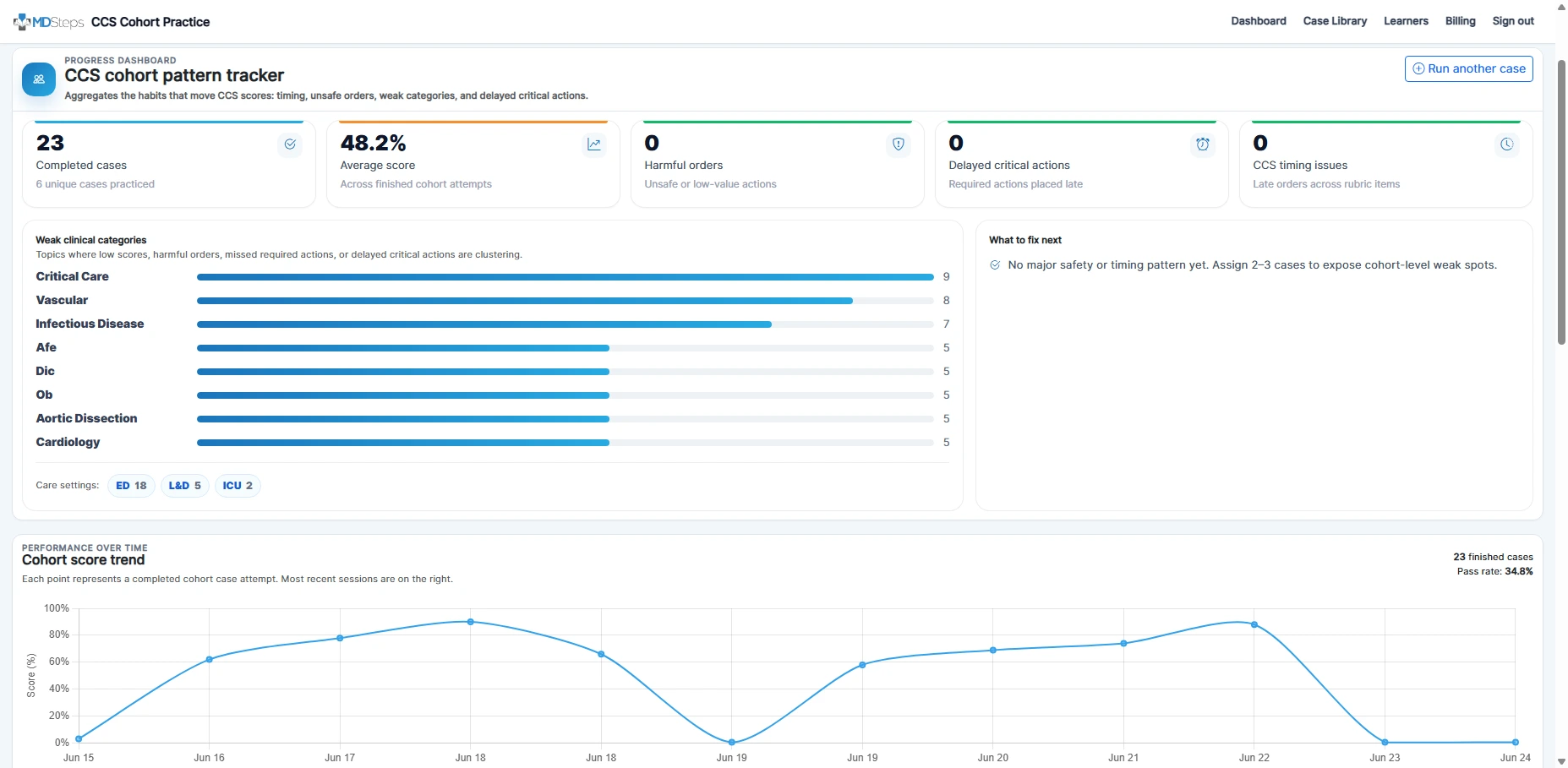
Instead of waiting for learners to self-report progress, instructors can see who completed assigned cases, how scores are trending, and which decision patterns are clustering across the cohort.

Completion trackingWeak categoriesPass rateRecent attempts

Everything an instructor needs to manage CCS practice.

Keep learners focused on assigned cases while giving faculty the reporting layer needed to identify patterns, protect assessment integrity, and intervene early.

Assignable case library

Choose cases from the main CCS library, set due dates, and control exactly what learners can access.

Cohort analytics

Track completion, average score, pass rate, timing issues, delayed actions, and weak categories.

Decision-log comparison

Compare how different learners handled the same case and identify delayed, missing, or unsafe management choices.

Learner profiles

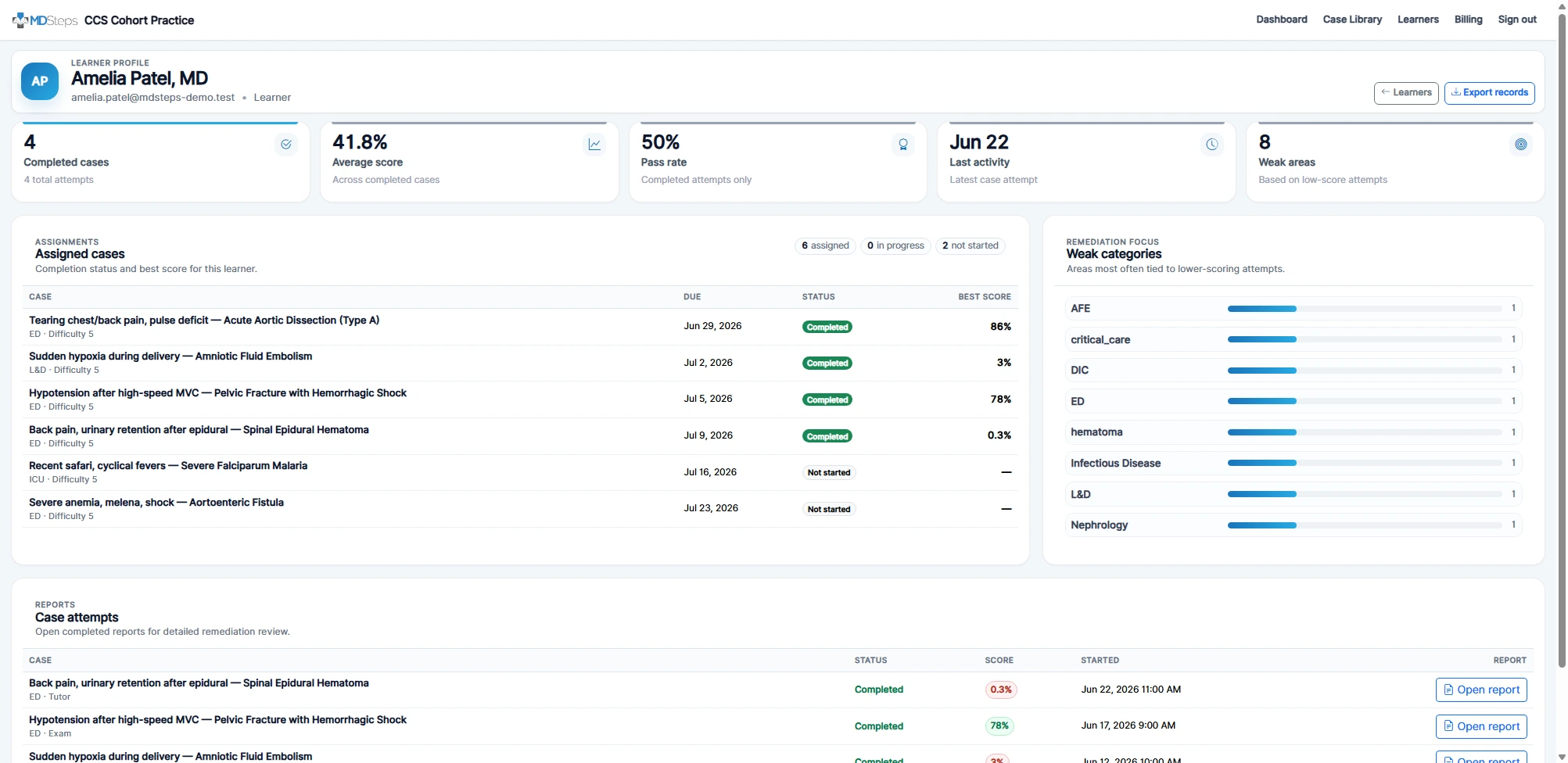
Open a learner detail page with assigned cases, completed attempts, scores, weak areas, and reports.

CSV exports

Export completion, learner summaries, and assignment progress for program records.

Bulk invites

Invite an entire cohort at once, manage seats, and keep learners inside CCS-only access.

See the exact moment management decisions diverged.

Faculty can review finished attempts side by side, identify delayed decisions, open individual reports, and turn case review into a focused remediation or academic half-day discussion.

Attempt comparisonIndividual reportsDelayed actionsRemediation focus

Learners see only what they need.

Cohort learners receive CCS-only access. They can complete assigned cases, review their own reports, and return to the cohort dashboard without seeing the full case library or the broader MDSteps platform.

Assigned casesOwn reportsCCS-only accessNo full library exposure

Instructors get the remediation and assessment view.

Faculty can assign cases, protect the case library, compare attempts, open learner reports, export records, and identify who needs targeted review before exam day.

AssignmentsScope controlComparisonsExportsLearner reports

From setup to remediation in four steps.

1

Create cohort

Name your program, choose learner seats, and create the admin account.

2

Start checkout

Choose your learner seat count and begin a monthly cohort subscription.

3

Invite learners

Invite learners individually or in bulk. Learners only see assigned CCS work.

4

Track results

Review completion, compare attempts, export records, and remediate weak areas.

Common questions

Is this for residency programs only?

No. It is built for residency programs, tutoring companies, IMG cohorts, school groups, and any instructor-led Step 3 group.

Do learners get the full MDSteps platform?

No. Cohort learners receive CCS-only access and can only access assigned cohort work and their own reports.

Can we hide cases until we assign them?

Yes. Learners do not see the full case library. Admins and instructors can release specific cases for remediation, formative assessment, academic half-day review, or cohort practice.

Can instructors see individual reports?

Yes. Admins, owners, and instructors can open learner reports and compare attempts across the same case.

Can we export completion records?

Yes. Cohort admins can export learner summaries, assignment progress, and completion records as CSV files.

Give learners controlled CCS practice and give your program the data to guide remediation and review.

Set up a cohort, choose learner seats, and invite learners after checkout.